Google

Wednesday, September 5, 2007

Online banking directory

AIB 24hour-online - Ireland
Allied Irish Bank's customers can obtain online access to their bank accounts.

Allstate Bank - USA
Internet-only bank that offers checking and savings accounts, CDs and mortgages.

AmTrust bank - USA
AmTrust Bank is an online division of Ohio Savings Bank, a multi-branch B&M bank that offers free online banking, free checking with interest, free bill payment and a variety of loans.

Arkansas National Bank - USA
The first bank in the state of Arkansas to offer Internet banking services.

ASB Bank Fastnet - New Zealand
New Zealand service offering balances, statements, transfers to other ASB accounts, bill payments and automatic payments to ASB Bank customers.

Bank Caroline - USA
Internet banking with no branches, great rates and friendly service.

Bank of East Asia Cyberbanking - Hong Kong
Hong Kong service. Includes account details, funds transfers, bill payments and time deposits.

Bank of Hawaii: e-Bankoh - USA
Customers can view their accounts and investments online.

Bank of Montreal - USA
Offers customers access to accounts through the Internet.

Bank SA Internet Banking - Australia
BankSA - Do your banking anywhere, anytime with BankSA Internet Banking

BankCaroline - USA
Internet banking with no branches, great rates and friendly service.

BankDirect - USA
Banking Online with BankDirect - saving money in personal banking by leveraging the power of the internet.

BankDirect - USA
Banking Online with BankDirect - saving money in personal banking by leveraging the power of the internet.

Banking 365 Online - Ireland
Online service for Bank of Ireland customers.

Banner Bank - USA
Customers can pay bills on-line, transfer funds, check balances and make loan payments. Washington, Oregon, and Idaho locations.

Barclays - UK
Offering internet banking to private and business clients. Global locations, with base in the United Kingdom.

Bill Centers - USA
Bill Centers is a FREE bill paying portal to consumers, companies and banks. Save $100 a year compared to Paytrust.com, GE Bill Manager, Citibank Bill Center, American Express, etc..

BillJunction.com - India
India-based service allows customers to pay utilities, credit cards, property tax and ISP bills online.

Bills.com - USA
Pay bills over the Internet using Bills.com Bill Pay, the electronic way to pay ALL your bills.

Cahoot - USA
Banking online with cahoot is easy, access to your accounts 24 hours a day or use our mobile banking and automated telephone services

Citibank Online - USA
Online banking for CitiBank customers.

Citizens Bank Online Banking - USA
Customers can access their Citizens Bank accounts online.

ClearNow - USA
Save time and eliminate headaches! ClearNow is the most cost-effective way to collect rent from your tenants.

Commerce Bank Online - USA
Provides customers with online access to financial services.

Deluxe Financial Services, Inc. - USA
Provides online banks with the services necessary to support Internet account openings.

E InvestmentBank - USA
Associated with Wedbush Morgan Securities in the US. Provides access to IPOs and private placements over the Internet, research and access to capital for emerging companies.

ebank.com - USA
Online bank serves both small businesses and consumers.

Egg - Prudential Banking - UK
UK-based Internet bank gives customers online access to their accounts.

Everbank - USA
Online bank that offers full-service banking, with a mortgage banking, and investing services to US domestic users

Everbank.com - USA
Offers Internet banking and other financial services.

fbr.com - USA
Web-based investment bank that distributes IPOs and venture capital investments to online investors. Subsidiary of Friedman, Billings, Ramsey Group Inc.

Fifth Third Bank - USA
Fifth Third Bank is a financial services bank serving Ohio, Kentucky, Indiana, Illinois, Florida, Michigan, and West Virginia markets.

First Internet Bank of Indiana - USA
Offers real-time online banking services to customers in Indiana, as well as checking, savings, and lending services.

First Republic Bank - USA
Provider of online banking solutions: deposits, lending, investment, and financial markets.

First Source Direct - USA
Access bank accounts with a personal computer.

Giantbank.com - USA
Secure Online Internet Banking. Earn higher returns and lower fees on giant Interest Checking, giant Money Market, giant IRA and giant Certificate of Deposit accounts and receive giant Relationship Services. No Lines. No Limits.

Griffon Bank - USA
Griffon Bank provides offshore banking services, online banking, internet bank accounts with free loadable debit card

Huntington Bank - USA
Online banking, investments, and, insurance.

ING Direct USA - USA
An FDIC insured national bank offering one of the highest savings rates with no fees and no minimums. ING Direct also provides highly competitive Certificate of Deposits, Mortgages, Home Equity Lines of Credit and Mutual Funds.

International Moscow Bank - USA
Provides online banking in the offshore environment of Montenegro.

INTRUST Bank OnLine - USA
Kansas bank offering online banking services to its customers.

Lloydstsb Online Banking - UK
One of the main 4 high street banks in the UK. Provides all standard online banking facilities for domestic account holders.

Mellon Online Banking - USA
Mellon Bank offers online trading, bill paying, funds transfer and stock quotes.

MyBankUSA - USA
Offers all aspects of online banking, a division of First Savings Bank.

National InterBank - USA
Online banking features high-interest checking, savings and CD's as well as free bill payment services plus low interest rate loans and realtime access.

NatWest Online Banking - UK
UK service offering balances, statements, transfers, bill payments, third party payments and standing orders.

nBank - USA
Offers online banking products to consumers and businesses.

Netbank.com - USA
Offers complete Internet banking and financial services.

NetmasterGold - USA
A mutual society offering financial services including mortgages, savings, personal and business banking, internet banking, insurance, sharedealing and commercial mortgages.

NetTeller - USA
An Internet-based home banking solution that delivers real-time interactive information solutions to a business' retail and commercial customers.

Ohio Savings Bank By Net - USA
An internet-based banking system that allows customers to access their bank accounts online.

Online Banking Report - USA
Online Banking Report - Since 1994, the independent source for online banking, payments, and lending research, statistics, and strategies.

Online Resources - USA
Online Resources powers online banking, bill presentment, payments, and relationship management for banks and credit unions.

Payments.com.au - USA
Allows consumers to pay bills via the phone and Internet.

Paytrust - USA
Paytrust.com is complete online bill delivery, payment and management. Paytrust is secure, private, and provides quick and easy bill management.

Piggybills - USA
We receive your bills, put them on our secure Web site, and compile all your debt information into a convenient status report.

Presidential Online Bank - USA
Internet banking with several branches. 6% Checking, High rates, great customer service, easy and safe, 24-hour access. Bill payer and online statements.

Principal Financial Group - USA
The Principal Financial Group is a nationally known provider of 401k plans, mutual funds, retirement plans, investments, life insurance, health insurance, and on-line banking. Online customer service, education.

Quicken Bill Pay - USA
Provides services to receive, view and pay bills online.

Rietumu BankWorld - USA
Register and login for online banking. Includes company information, fees and services available.

Security Service Federal Credit Union - USA
Offers remote banking services to its members.

TD Canada Trust - USA
Features EasyWeb Internet banking. Includes investing, insurance, banking, and small business.

TheBancorp.com - USA
A full featured internet bank intended for US domestic users.

U.S. Bank Internet Banking - USA
We've redesigned U.S. Bank Internet Banking around you. It is now easier to use than ever - the familiar checkbook format makes it easy to use. Access your U.S. Bank checking, savings, credit card or loan accounts and check account balances, transfer funds.

Unity Trust Bank - USA
Provides online banking and financial services including business banking, personal loans, commercial insurance and road rescue.

UseDirectPayment.com - USA
This site allows consumers to learn about and use Direct Payment. Consumers can also sign up for Direct Payment here to pay their bills automatically.

VirtualBank - USA
VirtualBank, the Internet's premiere online bank. We offer a full suite of financial products and services including jumbo mortgages to $4 million, low rate personal loans, as well as a wide range of superior banking products.

Wells Fargo Online Banking - USA
The online banking entry point for Wells Fargo.

Winbank - USA
Greek bank offering banking and investment services via the Internet.

WR Hambrecht & Co. - USA
Provides an auction process for distributing stock to individuals and institutions.

Yahoo! Bill Pay - USA
Allows payment of bills to anybody in the United States that accepts a check.


Introducing Enhanced Online Security from Legacy National Bank.

Legacy National Bank is proud to deliver the highest level of security for our Legacy Online Banking customers. An additional layer of security is being added to our log in process. This will help ensure that your information is secure, protecting you from fraud and identity theft. Click & Learn

How it works - Enhanced Online Security verifies your identity in two ways. Every time you log in to Legacy Online Banking, the bank identifies you, and it lets you identify the bank using a private image and pass phrase.

Enroll for Enhanced Online Security
Enablement screen

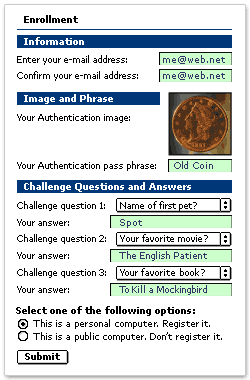
To enroll for Enhanced Online Security, follow these steps. Click & Learn

  1. Log in by entering your current Access ID.
  2. Click SUBMIT.
  3. Enter your current password.
  4. Click SUBMIT.
  5. Complete the Enrollment form.
    1. Provide a current e-mail address (if needed).
    2. Enter a pass phrase for the randomly selected authentication image.
    3. Provide answers for 3 challenge questions.
    4. Select whether you are logging in with your personal computer, or a public computer.
      Only register personal computers that you frequently use and are not available for public use.
  6. Click SUBMIT.

That’s it. The next time you log in, Enhanced Online Security will recognize you and display your private image & pass phrase.


Log in with Enhanced Online Security

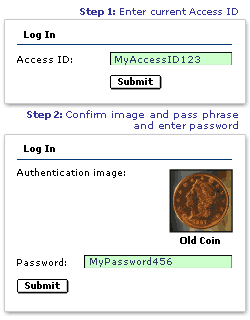
Log InOnce you have enrolled for Enhanced Online Security, follow these steps to log in. Click & Learn

  1. Log in using your current Access ID.
  2. Click SUBMIT.
  3. Your authentication image & pass phrase are displayed.
  4. If they match your private image and pass phrase, then enter your password.
    If the authentication image and pass phrase do not match, do not enter your password. Start over, or contact Legacy National Bank at 479-717-1900 for assistance.
  5. Click SUBMIT.

That’s it. You are now securely logged in to Legacy Online Banking.


Log in from other locations

Learn how to log in from computers other than the one you enrolled with, or when logging in from other locations. Click & Learn

Change your Image & Pass Phrase

Over 10,000 images for you to choose from. To select the one that's right for you, just follow these steps.

  1. Log in by entering your regular Access ID.
  2. Your authentication image & pass phrase are displayed.
  3. If the authentication image and pass phrase are correct, enter your password.
  4. Click SIGN IN.
  5. Once logged in, Select Options from the main menu.
  6. Select Change Security Data.
  7. Select an image from the library.
  8. Enter a pass phrase for the image.
  9. Click SUBMIT.

That’s it. The next time you log in, your new authentication image and pass phrase will be displayed.

Banking security: Challenges ahead

Business case for preventing certain types of attacks
There a number of attacks which require large investments which may not be justifiable given the customer base of some banks?

In fact, there are many banks that are willing to compensate for the fraud losses of the customers as that is more cost effective to putting up a solution to prevent the same.

Security policy
The security policy needs to be continuously monitored and updated as a result of newer security threats. Which means that the bank has to continuously evaluate the risks, the cost of technology solutions and even upgradations. It gets all the more challenging due to a variety of technological solutions available in the market, each addressing individual problems but none offering a one-stop solution.

Customer education
A number of online banking users are naïve to the types of threats they face online and the precautions that they must take. Therefore, customer education becomes a key element to prevent the manifestation of a number of risks into frauds. The banks have to decide which is the best medium for the communication, message for the communication, frequency of communication and so on and so forth.

Online banking usage also depends a great deal on the customer-targeted communication from the banks to alleviate such fears. It is much easier for the experienced eyes of an internet-savvy user to detect potential phishing attempts when compared with a customer who has recently migrated from old school of banking to more recent modes.

Studies have also shown that first time users or users who have started adopting online banking do not continue to use them if they are struck by a fraud or attempts of fraud as their confidence on such a channel is drastically reduced and fall back on the traditional modes of banking.

A lot has to be communicated to customers. The onus of ‘real online-enablement’ of banking customers is usually left to the printed matter. The existing delivery channels (like ATMs, kiosks, online banking, POS) should be used to push this information to the customers in innovative ways.

Wherever technological controls are not feasible, procedural controls should be implemented to check frauds. As indicated before, solutions like exchange of personalised digital images between customer and bank website ahead of password entry prevents phishing. One time password through SMS, virtual keyboard, software version of two factor solutions are other strategies that banks can adopt to ensure better security in online banking.

It is therefore upon regulatory bodies to enforce online security norms, thereby rewarding initiative and innovation from the banking and IT communities.


The author is global head of sales, Finacle

Monday, August 13, 2007

Online banking

LOGIN:
During your first initial login (ONLY) to Home Savings' Online Banking, the system will prompt you to:
accept Home Savings' Electronic Funds Transfer Agreement.
change your password. NOTE: Your password must contain between four to six (4 - 6) DIGITS.
provide your email address.
If you fail to successfully login after five (5) attempts, the system will lock you out. If you are locked out or have forgotten your password, please contact our Deposit Operations Department at 330-781-6525 locally or toll free 1-866-466-3050.
If you can view the other areas of our web site but are unable to access Online Banking, it may indicate a problem accessing all secured web sites. Both your browser and Internet service provider must support secured sites. The Online Banking site is designed for Netscape® 7.2, Microsoft® Internet Explorer 7.0, Mozilla Firefox 1.0 or Safari 1.2 for Macintosh. Using other browsers may cause the pages to appear misaligned and prevent access to Online Banking. NOTE: It is highly recommended that you use newer browsers to access Online Banking.Recommended Browsers
Microsoft Internet Explorer 7.0 (includes AOL 8 & 9)
Netscape 7.2
Mozilla Firefox 1.0
Safari 1.2
Be sure to select a supported version when downloading at the following locations:
Microsoft® Internet Explorer Download:
http://www.microsoft.com/windows/ie/default.asp *
Netscape® Navigator Download:
http://browser.netscape.com/ *
America Online® Download:
http://www.aol.com * or AOL Keyword: upgrade
Mozilla Firefox Download::
http://www.mozilla.org/products/firefox/ *
Safari Download:
http://www.apple.com/support/downloads/ *
ACCOUNT ACCESS:
Once inside Home Savings' Online Banking system, you can change your User ID and Password at any time under "User Options."
To change your User ID: Click on "Change User ID." Your ID must be different than your current one and must be 6 to 20 characters (alpha and/or numeric) in length.
To change your Password: Click on "Change Password." Your password must contain between 4 and 6 digits. Your Online Banking password ensures that only you can access your confidential information. Please remember this password and keep it secure. For security purposes, if you forget your password you will have to be reset.
You can change the default start page to your account summary, account transfer, export, etc. page by changing the setting located under "User Options."
To view the history of your accounts, click on the corresponding account listed in the Account Summary table. You can customize the date range (i.e. current month only or current month and the previous month) that is initially shown on the account history page under "User Options."
To list the dates of your transactions in descending order, click twice on the arrow located next to the category "Date" in the account history table. You can also sort your credits, debits and check numbers in the same manner. You can also default the account history date sort to either descending or ascending order via the "User Options" page.
You have the ability to change account names for easier recognition under the "User Options" icon. You may also elect not to display selected accounts using the "Account Nickname" feature.
Your timeout period determines the amount of time between pages that your session is valid. You can change your timeout period under the "User Options" icon. Lower numbers offer more security while higher numbers offer more convenience.
If your Online Banking pages load very slowly, you may want to change the format of your pages to the "text mode" to allow for a faster download time. This setting can be changed by clicking on the "User Options" icon.ADDITIONAL ASSISTANCE:
If you are in need of additional assistance, please refer to the
demo, online help index or the page-specific help feature located on all pages within the Online Banking site. You may also call Home Savings' Deposit Operations Department during normal business hours (Monday through Friday, 8:00 a.m. to 5:00 p.m.) at 330-781-6525 locally or toll free 1-866-466-3050.
*This is a link to a third-party web site. Home Savings does not provide and is not responsible for the products, services or overall web site content available on the linked third-party site. Our privacy policy and security practices also do not apply to the linked site. You should consult the privacy disclosures on the site for further information.

Onling Banking Tips

How do I reorder checks?
To reorder checks online, click on the ‘Order Checks’ button in the top navigation. You will be taken to our check-ordering site. If you want to reorder the exact same checks you currently have, click on the ‘Quick Reorder’ button. If you would like to change the design of your checks, click the ‘See Check Design’ button. Don’t forget you can always check your order history and status by clicking the ‘Get Order Status’ button.
How do I pay my Bellco Credit Card?
After logging into BELLCOnline, click on ‘Credit Cards’ in the left navigation. You will have to enter in your credit card number once. After clicking the ‘submit’ button, your credit card number is stored. For your security the credit card number is encrypted before it is stored. Now, click the ‘submit’ button one more time and you’ll be taken to the EZCardInfo site. On this site, you can view you account balance, search for transactions and even pay your credit card online!
Download Accounts into Quicken or MS Money
After logging into BELLCOnline, click on the account tab you want to download. In the "How do you want to view your transactions?" section, click on the Download link. Choose the account you want to download in the "From This Account" drop down. Choose the software (ie Quicken, Microsoft Money) you want to use. Finally, choose the start and end dates . When you click on Download Now, your financial software will automatically appear and your transactions will be downloaded.
The first time you click the Download Now button, you will be asked to agree to the Terms of Service. If you are an Advantage Gold or Premier Platinum member, you will receive Downloads for free. If you’re a Valued Silver or Bellco Rewards member, you will receive Downloads for $2.00 (a 50% discount). If you are not in a Relationship Rewards package, you will be charged $4.00 a month. Don’t forget, the first month of downloads is free!
At this time, Bellco Credit Union does not support the downloading capability for Macintosh.
Search Accounts
Did you know you can perform advanced searches on your account information? Let's say you can't remember how much you spent at the grocery store and you're not exactly certain what day you purchased groceries. We can help!
After logging into BELLCOnline, click on the checking tab. In the "How do you want to view your transactions?" section, click on the orange Advanced Search radio button. You can search by Description, Amount, and even dates. So the next time you need help, type "King Soopers" in the Description section and enter a date range. It's that easy!
Don't forget that you can also search for checks that have cleared too!
Rename Accounts
Do you ever have trouble remembering all of your account numbers? Did you know you can rename your account to something that’s easy for you to remember?
You can change the names on your accounts to College Fund, California Vacation, or Mike’s Honda. Whatever you’d like.
To rename your accounts, click on "Preferences" in the left navigation. Then click on "Rename Accounts." Type in the new account name and click submit at the bottom of the page. It’s that easy!

Why can’t I transfer money out of my own account as many times as I want to?
Have you ever wondered why you can only transfer 6 times out of your savings account per month?
Federal Regulations limit you to six (6) transfers per month from your savings account using online banking. This regulation applies to all banks and credit unions in the U.S. However, there is good news. After you’ve reached your six online withdrawals from savings every month you can still make as many withdrawals as you’d like at the ATM. Use our extensive surcharge-free ATM network at anytime.

Free Bill Pay
If you have a TimeSaver or MoneyMax Checking account you now get Bill Pay for free! Just log in to online banking and choose ‘Bill Pay’ from the top navigation. It’s easy to start paying your bills online today. No lengthy sign-up process, just enter you email address and you are ready. Bill Pay - it’s the easy way to pay.

How to print your eStatement
With eStatements, Bellco has expanded the number of ways you can access your Bellco accounts and better manage your finances. Now you can access your end of month account statement via the Internet -- and it's free!
To access your eStatements, log into BELLCOnline and click on "Accounts" in the left navigation. Then click on "eStatements" and the "View Statements" link.
If you have more than one primary savings account, you will have to select which account you want to view. All your other accounts (checking, savings, Line of Credit, Loans) are tied to one Primary Savings Account. Or, you can view all your accounts that are linked to your Membership Account.
Click the "View Statement" button and a page will appear with all your statements listed in order. Click on the "View" link of the particular month you want to look at.
If you want to print your eStatement, click on the printer icon in the upper left corner. Do not use the Ctrl-P command to print, as it will cut off key information on the printed page.

Set your own time out
Did you know you can change your session timeout? If you take longer to pay bills or view eStatements, you can increase your session timeout to up to 30 minutes.
To change your timeout, log into BELLCOnline and on the left navigation, click "Preferences." Then click "Change Timeout."
No more getting logged out before you’re ready!

Viewing your checks online is so simple!
First, click on your checking account. In the Transaction Detail section, you can see the checks that have cleared. When you click "View Check" you see an exact replica of the check scanned (front and back).
Another option...In the left navigation, if you click Accounts -> View Checks, you can type in a check number and it will find it. If your check hasn't cleared, you'll receive a message that says, "Cannot find image."
If you’re in a Relationship Reward level, you can view as many checks as you want – for free. All other members can view 6 free check images a month. After that, you will be charged $1.00 for each check image viewed.

You can use something other than SSN to log in
Did you know that you no longer have to use your social security number when logging into BELLCOnline? It’s easy to change to a Username!
First, log into BELLCOnline using your SSN, TELLERPhone PIN and password. On the left navigation, click on "Change PIN/Password" under the Preferences menu. Click the Username radio button and enter in your new Username twice (notice that it must be 10-20 characters long). Click the logout button in the top right corner. Now you're ready to use your new Username!
Once you set up your Username, you CANNOT use your SSN to login.
If, at any time, you want to use your SSN to login again, go back to the same "Change PIN/Password" page and select the SSN radio button.

6 cool new online banking tips

In ancient-financial times (say, in the year 2000), banks began offering small business customers the ability to bank online — for a price. Sometimes a hefty price.
Related Links

Online banking's best lure: Online bill paying

More on finance and accounting

Microsoft Office Small Business Accounting 2006 product information

How to reach out to customers — and increase sales

Key features in Office Small Business Edition 2003

Find a technology consultant in your area

More tips and advice for running your business

Product info for Microsoft's small-business solutions

Product info for Microsoft's online services

Online seminars and business events in your area


Home
Tech Support
Security
Products
Windows
Windows Vista Business
Windows Vista Ultimate
Windows XP
Office
Office Small Business 2007
Office Professional 2007
Office Small Business Management 2006
Office Small Business 2003
Office Professional 2003
Office Live
Small Business Server
Financial Management
Office Accounting 2007
Microsoft Dynamics GP
Microsoft Dynamics NAV
Microsoft Dynamics SL
Microsoft Dynamics RMS
Microsoft Dynamics POS
Microsoft Small Business Financials
Customer Management
Online Services
Microsoft adCenter
Office Live
Other Products
Microsoft ResponsePoint
Office SharePoint Designer 2007
Office Visio 2007
Office OneNote 2007
Office Project 2007
Office Live Meeting
Office MapPoint 2006
Learning Center
Microsoft Startup Center
Business Articles & Insights
Finance
Management
Marketing
Technology
Business Startups
Ask the Expert
Software Tips & Tricks
Local Events & Webcasts
Local Events & Webcasts Overview
Microsoft Connections
Events & Training
Recorded Webcasts
Small Business Summit
Microsoft Across America
How to Buy
Special offers
Microsoft Small Business Center Home
setLivePersonVars('InviteOnly');


You can probably guess what happened next. Business owners responded with a resounding silence. The last thing most people needed was an "opportunity" to pay for something that had been free.
Well, banks seem to have gotten the message. Fees have dropped sharply or have been eliminated on many services. The online banking offerings have increased. And more businesses are doing at least some of their banking online, lured by convenience, the ability to track their own financial activities online, and the potential of saving time.

See account activity online
"We're now seeing a lot more features and functionalities for small business owners to do more online and to manage their cash flow," says Matthew Lehman, senior analyst with Watchfire Gomez Pro, a research company focusing on financial services.


Learn more about Microsoft Office Small Business Accounting 2006
Small Business Accounting is easy-to-use, full-featured accounting software with the familiar look and feel of Microsoft Office 2003.
Learn more

Among the online offerings becoming more common:

Check imaging: About 70% of the banks surveyed by Watchfire in 2004 were offering business clients the option of getting online check imaging.
"For the small business customer, this is like having account-tracking capabilities," says Lehman. "Small business owners can use this capability to look at their accounts and see which checks have been deposited and accepted."

Deposit ticket review: Another online feature some banks are offering: deposit tickets.
"If you are handling a lot of checks, this is a valuable feature because it gives you the ability to go back and see what you were depositing," says Lehman.

Coordination between accounts: Electronic banking is part of the general move toward allowing integration between different bank accounts.
Lehman says banks are making it easier for small business owners to link their business and personal accounts so they can make online transfers between accounts — rather than the old-fashioned method.

Payroll and other services: Virtually every online small business banker has a bill pay component, or the ability to schedule and pay multiple bills at one time. "What you're seeing more of is the capability for businesses to conduct other types of financial activities as well," says Lehman.
Among the options: Using online banking to pay suppliers, setting up direct deposits for employees, payroll services, payment of employment taxes and sending out payment in foreign currencies.
Top of page
Making deposits from your desk
Burt Davis, director of small business banking with Netbank in Alpharetta, Ga., says that his institution is trying to be a leader in online services for small businesses. Among the products in the works: a system that allows businesses to automatically collect payments from customers, and a way to allow business owners to make deposits without having to leave their businesses. "We'll have a device in your business office, and you'll be able to scan a check and electronically deposit the funds without leaving your business unattended," says Davis.
This type of feature is similar to what retailers like Wal-Mart have when they take a customer's check, electronically scan it, get authorization for an electronic-funds transfer, and then give the approved and voided check back to the customer.
The services now available and under development reflect financial institutions' increased focus on the needs of smaller business clients. "At first, banks took regular consumer offerings and set them up for businesses," says Lehman. "Then they realized that the needs of consumers are not the same as the needs of a small business, so now they are adding things that are more germane to small businesses."
Banks may offer basic services, such as the ability to see your account history or to make transfers for free, and then charge extra for such goodies as wires, ACH, tax payments and so on.
Of course, anyone involved in commerce over the Internet has to be aware of threats from "phishers" and other frauds trying to break into individual and business bank accounts. Currently consumers who report an electronic funds transfer problem within two days are generally liable for no more than $50 in losses from their accounts. Business accounts, however, don't get the same protection. If you're victimized and the bank determines that your security (or lack thereof) led to the loss, you could be out of luck. Software and firewalls as well as other security measures are essential for anyone doing business on the Internet.
Most of the online banking services offer ways for business customers to link parts of their banking activities and record keeping with information logged into Quickbooks, Microsoft Money and other financial programs.


Joseph AnthonyJoseph Anthony is a tax professional in Portland, Ore., who writes about finance and tax issues affecting small businesses. Send Joseph an e-mail. For customer support options, tailored business advice, and a single point of access for Microsoft's small-business solutions, see the Microsoft Small Business Center home page.

Online Banking Use

Tips on making payments - and see more tips on payments in Online Banking
If you double-click buttons or links you'll be logged out. This is for security reasons and to ensure that an application or transaction is processed in the right way. If you've already clicked on a button or link, wait for the page to load.
Always use the green 'next' buttons and blue 'back' buttons on the bottom right of your screens to move through Online Banking as your browser back and forward buttons won't work and you may get logged out. We do this for security reasons.
You can choose how you view your online statements by visiting the 'Customise My Site' link in the left-hand menu of your homepage.
Always check that the payment details you're using are correct before confirming a payment.
Making a payment to a credit card? Use the long card number as the reference.

If possible, print step 4 of 4. This is confirmation that your payment's been made and can be referred to if you have any problems with your payment.
Not sure where to find the payment option you need? Use the All Payment Options page - the link is in the left-hand menu of your At a Glance page.
If you've got payees saved that you no longer use, delete them using Delete Payees from the left-hand menu of your At a Glance page.